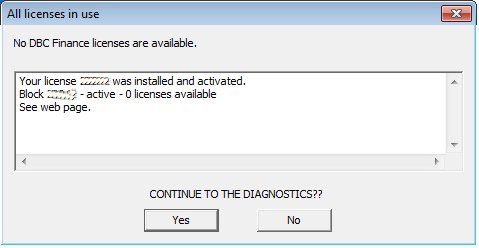
Internet license - all licenses in use
If the DBC program can't start because all the Internet licenses are in use, the diagnostics tool will start (see DBC Finance example below). It will explicitly indicate all licenses are in use. In this example, there is only 1 license. Refer to the web page to view the license configuration and the current users. Continue to the diagnostics to confirm there is no problem with the license and/or send a note to DBC.
The web page will resemble the screenshot below.

The License information section lists the license configuration as well as which/how many modules are in use.
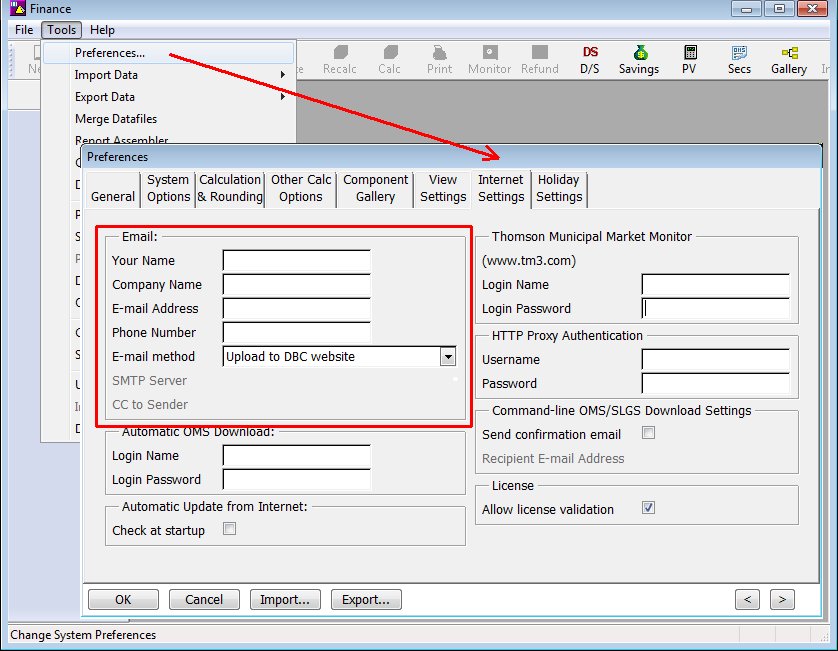
The User information section lists the users' e-mail addresses. The user must have provided their contact information in the DBC program (see below) otherwise unknown will be printed. The e-mails are provided so the users may be contacted.
To enter the e-mail address in the DBC program, go to:
Tools | Preferences | Internet Settings
Or
Tools | System Preferences | Internet Settings